Addins
Attachments Alarm
Posted on Monday, February 9th, 2009.
Filed under Addins.

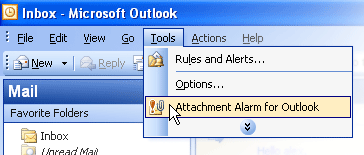
If sending email you tend to forget about attachments, try the Attachment Alarm for Microsoft Outlook. This email add-in will never let you forget to add an attachment in email if the body of a message contains key words (“see attachment”, etc.).
Attachment Alarm works with Microsoft Outlook 2007, Microsoft Outlook 2003, XP (2002), 2000
Attachment Alarm for Microsoft Outlook is very easy to use and requires no hard tuning. You just specify the words and phrases that may occur in the body of the Microsoft Outlook e-mail message and imply an attachment (“see attachments“, “see attachment“, “in attachment“, “the file attached” etc.) and add these words to the Key words list.


Product Images
Software Specifications
| Addin Version: | 2.0.1.17 |
| Product URL: | http://www.ablebits.com/email-attac... |
| Company URL: | http://www.ablebits.com... |
| Support URL: | http://www.ablebits.com/support/ind... |
Pricing
| Cost: | $19.95 |
| MultiUser Licenses? | No |
| Trial? | Yes |
Minimum Requirements
| Operating System: | Microsoft Windows XP |
| Outlook Version(s): | Microsoft Outlook 2000 Microsoft Outlook 2002 Microsoft Outlook 2003 Microsoft Outlook 2007 |
| Hard Drive Space: | 0 (MB) |
| Memory: | 0 (MB) |
Attachments Alarm is an addin for Microsoft Outlook.
Addins are sometimes referred to as Plugins. The Outlook Utilities along with the Leprechaun Works, LLC
makes no warranties or guarantees as to the product capabilities or the information describing said product.