Addins

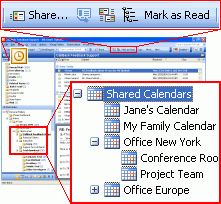
If you are looking for a quick and easy way of sharing and synchronizing your Microsoft Outlook Calendar or creating and sharing multiple Calendars, this program is for you.
How to share Outlook Calendar? You just need to install ShareCalendar on your computer running Microsoft Outlook 2000/2002/2003/2007 and on computers of your preferred teammates, and after a few clicks their calendar folders information will be synchronized each time you update the shared folder on your PC. Your partner will receive the updated Calendar items (appointments, meetings, events) by regular e-mail. You are able to update and manage all your shared Calendar folders offline or using any Internet connection. It is an easy and effective solution for remote companies and groups.


Product Images
Software Specifications
| Addin Version: | 3.01.0536 |
| Product URL: | http://sharecalendar.4team.biz/... |
| Company URL: | http://www.4team.biz/... |
| Support URL: | http://www.4team.biz/support_form.a... |
Pricing
| Cost: | $24.95 |
| MultiUser Licenses? | No |
| Trial? | Yes |
Minimum Requirements
| Operating System: | Microsoft Vista |
| Outlook Version(s): | Microsoft Outlook 2000 Microsoft Outlook 2002 Microsoft Outlook 2003 Microsoft Outlook 2007 |
| Hard Drive Space: | 10 (MB) |
| Memory: | 0 (MB) |